
Network Topology Software
Easily create an automated, dynamic network layout map
Display your network topology easily with out-of-the-box layouts
With SolarWinds® Network Topology Mapper (NTM), displaying your network topology is easy. With several out-of-the-box layouts, NTM offers a flexible solution to your device mapping process, without the need for manual effort. Preconfigured layouts help you establish the right layout quickly and efficiently. As auto-discovery continues to detect new devices and discover network topology more accurately, NTM can update your layout and show side-by-side performance metrics.
Choose from among multiple types of network topology diagrams for custom visualization
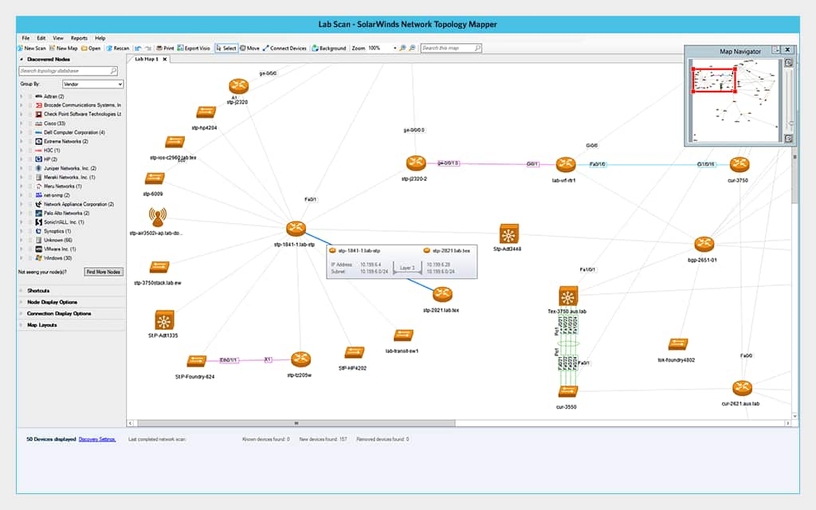
Topology maps can be divided into three general types: physical maps, logical maps, and functional maps. Each type of topology diagram offers unique benefits for network performance monitoring. Using the right visualization for network configuration can help you to monitor more efficiently, streamline optimization workflows by identifying changes faster, and view your network infrastructure in a way that makes the most sense.
For many types of visualization, NTM offers multi-layer visibility for an integrated insight into OSI layers 2 and 3, so you can leverage a complete image of your network layout.
Automate your network topology mapping with automatic discovery and diagramming

An efficient network topology diagramming software will automate as much of your mapping as possible. Network Topology Mapper enables you to create a topology map using auto-discovery and consistent network scanning features to ensure the map remains up-to-date with new devices. For LAN and WAN networks, NTM offers a variety of discovery approaches, including SNMP (v1-v3), ICMP, VMware WMI, VLANs, and more. Although NTM uses automated discovery tools, you can manually adjust nodes and connections as you see fit.
Scan your network at regular intervals to maintain an updated topology map
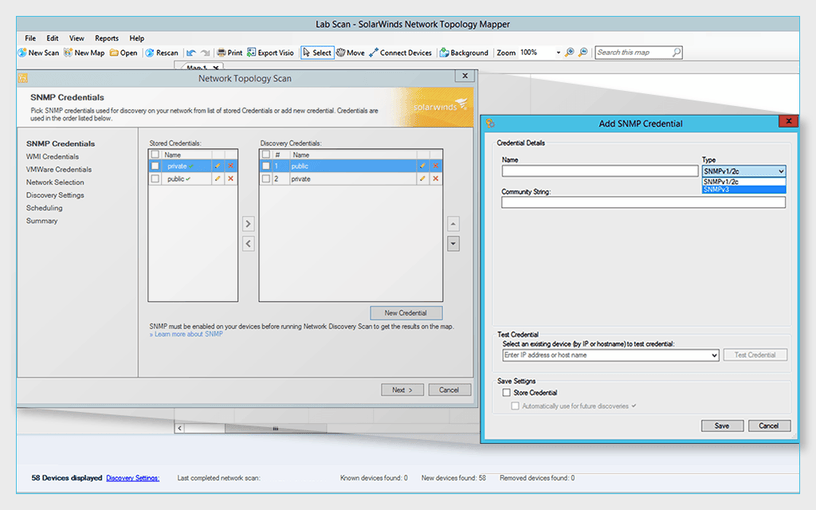
Once you’ve discovered devices and established your network topology diagram, NTM uses automated scanning to continually update your network map. You can easily customize the schedule for how NTM scans your network. Don’t worry about missing changes—NTM is built to instantly detect when changes occur to your configuration or when unknown devices enter your network. With each scan, you can automatically collect metrics and ID new devices.
Create detailed network topology reports to comply with industry audits

IT network topology mapping is a crucial component of a network security plan, and it can also be a compliance requirement. Multiple regulatory agencies require your network to establish and maintain a detailed network topology map to protect against unknown devices and potential security breaches.
To make your audit as smooth as possible, SolarWinds NTM enables you to generate topology reports and dashboards designed to help you demonstrate compliance with various industry standards, including HIPAA, SOX, PC DSSI, and FIPS 140-2.
Get More on Network Topology
Some common FAQs are…
Network topology provides a spatial and logical understanding of your network configuration. It refers to the arrangement and relationships of links and nodes on a network. Common network topology examples include star, bus, ring, tree, mesh, and hybrid forms.
In a network topology diagram, each device in your network is manifested as a unique node, and the relationships between devices are documented and updated as they change. Topology mapping allows you to more easily identify the operating devices within your network and to understand their relationships across physical distance and OSI layers. A topology map helps answer the questions: “What devices are in my network? How do these devices interact?”
To monitor network topology, you must first visualize network nodes and their relationships. This is where network topology mapping comes in. Network topology mapping produces a diagram representative of your network device configuration. Various line types can indicate connections and relationships between devices, and symbols are used at each node to represent different types of devices.
While you can manually determine your network topology, topology mapping software can allow you to save time and improve accuracy by automatically discovering and mapping devices. With SolarWinds Network Topology Mapper, you can monitor device metrics, identify and flag unknown devices, and collect device information for each new discoverable node.
Network topology provides a spatial and logical understanding of your network configuration. It refers to the arrangement and relationships of links and nodes on a network. Common network topology examples include star, bus, ring, tree, mesh, and hybrid forms.
In a network topology diagram, each device in your network is manifested as a unique node, and the relationships between devices are documented and updated as they change. Topology mapping allows you to more easily identify the operating devices within your network and to understand their relationships across physical distance and OSI layers. A topology map helps answer the questions: “What devices are in my network? How do these devices interact?”
To monitor network topology, you must first visualize network nodes and their relationships. This is where network topology mapping comes in. Network topology mapping produces a diagram representative of your network device configuration. Various line types can indicate connections and relationships between devices, and symbols are used at each node to represent different types of devices.
While you can manually determine your network topology, topology mapping software can allow you to save time and improve accuracy by automatically discovering and mapping devices. With SolarWinds Network Topology Mapper, you can monitor device metrics, identify and flag unknown devices, and collect device information for each new discoverable node.
Automatic discovery and mapping for efficient and versatile network topology
Network Topology Mapper
- Comprehensive network monitoring allows you to scan your network and discover new devices without manual configuration.
- Display network topology diagrams with your choice of out-of-the-box layouts and customization options.
- Export maps to Microsoft Visio and other user-friendly formats.
Starts at: